.svg)
Choosing Digital Signage Hardware: A Guide to Help You Select the Best Hardware for Your Digital Signage Needs
Are you thinking about migrating from print to digital signage in your office, store, or school setting?
One of the basic components to get started with your digital signage is hardware. Choosing the right hardware is crucial to the success of your digital signage.
With so many options available in the market, it can be overwhelming to decide which hardware to invest in.
In this blog post, we’ll explore the different options for your digital signage hardware and which ones are best suited for your needs.
When it comes to digital signage, screens are a critical component of the hardware setup.
The following are the various screen types out there and the best scenario for each:
Tablets:
Picture this – you’re about to enter a meeting room, and right outside is a sleek tablet displaying the room’s schedule.
Tablets are perfect for touchscreen setups or situations where viewers are up close and personal. Whether it’s in elevators, outside meeting rooms, or alongside products in stores, tablets serve as interactive guides. But remember, not all tablets are created equal.
Your choice will hinge on factors like usage duration, operating system, and your budget.
Non-smart TVs:
Are you on a budget but need a large screen? Enter non-smart TVs. They’re like that old PC you have – they need a little help (in this case, a media device) to showcase their potential.
But aesthetically? They’re as pleasing as any high-end screen.
Smart TVs:
Imagine a TV that’s also a computer. That’s a smart TV for you. These are perfect when you’re short on space.
But a word of caution: not all smart TVs are smart enough.
Some might dazzle you with their display but disappoint with their performance. Always check the specs, especially the operating system.
Within the umbrella that is smart TVs’s, there two main distinctions to keep in mind: consumer-grade TVs and Commercial grade TV’s

Photo by Scanrail on Adobe Stock
Consumer-Grade TVs:
Ideal for personal use, these screens are like the marathon runners who weren’t actually trained for a marathon but are naturally pretty athletic. They’re great for running for a while (up to 8 hours a day), but push them beyond, and you’ll see signs of wear and tear. This might not be your best bet if you’re thinking of a 24/7 display.
Commercial Grade TVs:
The Olympians of digital signage screens. Built specifically for the purpose, these can run for 16 hours or even 24 hours daily. They’re robust and bright, and many can even brave the outdoors. They might seem pricey initially, but consider them an investment that pays off in the long run.
If you decide to go with any of the above options that do not already have a way to connect your software to the internet, you will need a media player to turn your device into a smart device to run your software on your screen. This would be all of the above options except for Tablets and Smart TVs.
There are several types of digital signage media players available on the market. Some of the most popular types include:
Standalone Digital Signage Media Players:
These players are designed to work independently without needing an external computer or internet connection. They come with built-in storage and can be connected to a screen or display via HDMI or other video output. Standalone digital signage media players are ideal for small-scale deployments, such as a single lobby or retail store screen.
PC-Based Digital Signage Media Players:
These players are essentially small computers that run on an operating system, such as Windows or Linux. They are more powerful than standalone players and can be used for more complex deployments, such as multiple screens or interactive displays. They require an internet connection; content is usually managed via a web-based interface.
Android-Based Digital Signage Media Players:
These players run on the Android operating system and offer similar features to PC-based players, but are easy to install, update and troubleshoot.
They are easier to use and offer many apps and tools to manage content. Android-based digital signage media players are ideal for small to medium-sized deployments, such as retail stores or restaurants—more information about the benefits of using an Android player.
When choosing a digital signage media player, several features must be considered. These include:
Resolution:
The resolution of the media player should match the resolution of the screen or display it will be connected to. This ensures content is displayed correctly and in high quality.
Connectivity:
The media player should offer various connectivity options, such as HDMI, VGA, and USB. It should also be able to connect to the internet via Ethernet or Wi-Fi.
Content Management:
The media player should offer a user-friendly content management system that allows you to upload and manage content easily. Look for players that offer cloud-based content management systems, as these are more flexible and easier to use.
Remote Management:
The media player should have remote management capabilities, allowing you to manage content and settings from a central location.
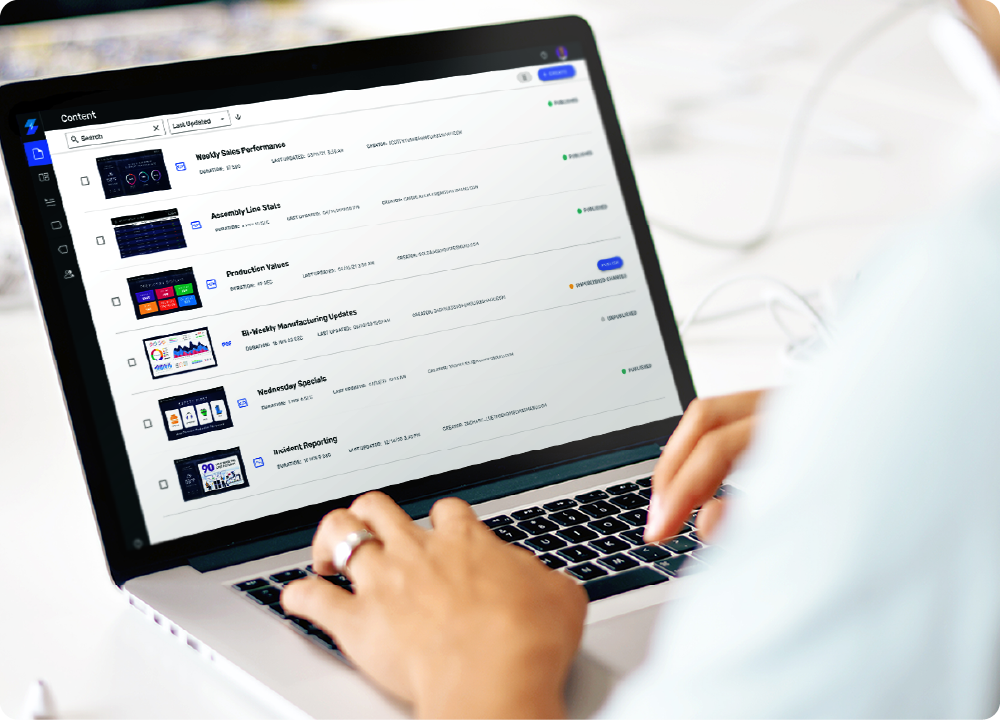
Skykit Beam Digital Signage Content Management Solution
Choosing the right digital signage media player depends on your specific needs and requirements. Consider the size of your deployment, the type of content you will be displaying, and the features you require.
For small-scale deployments, a standalone digital signage media player may be sufficient. For larger deployments, an Android-based player may be more appropriate.
Selecting the right hardware for your digital signage setup is crucial in achieving your digital signage goals. By understanding the different screen types, digital signage media players, and the features they offer, you can make an informed decision that best suits your needs.
The right hardware will ensure your content is displayed correctly, in high quality, and with maximum impact. With the right hardware in place, you can create a dynamic and engaging digital signage experience that will captivate your target audience!
If you have any questions or need help deciding which hardware best suits your needs, please contact Skykit, and we will be happy to discuss your needs and help you get started!
About Skykit
Skykit Is Providing Digital Signage Solutions And Workplace Experience Tools To Businesses Around The World.
What is Skykit? A lot of things, actually. An award-winning provider of digital signage and workplace experience solutions. A company boasting one of the largest U.S.-based development teams in the industry. A team of really, really passionate people. Launched in 2016, Skykit began as an idea—just a simple solution to a customer’s need for a digital signage platform.
Our software runs on tens of thousands of screens across the globe, simplifying employee communications, enabling businesses to attract new audiences, and providing the eye-catching displays needed to engage with existing customers.
We designed our platform to be infinitely scalable, making it the perfect option for businesses of all sizes across various industries because we’re here to help you make digital signage your most effective communication and marketing tool.
Some of our notable customers include Canon Inc., the University of Minnesota, and others. Are you next?










.svg)


