.svg)

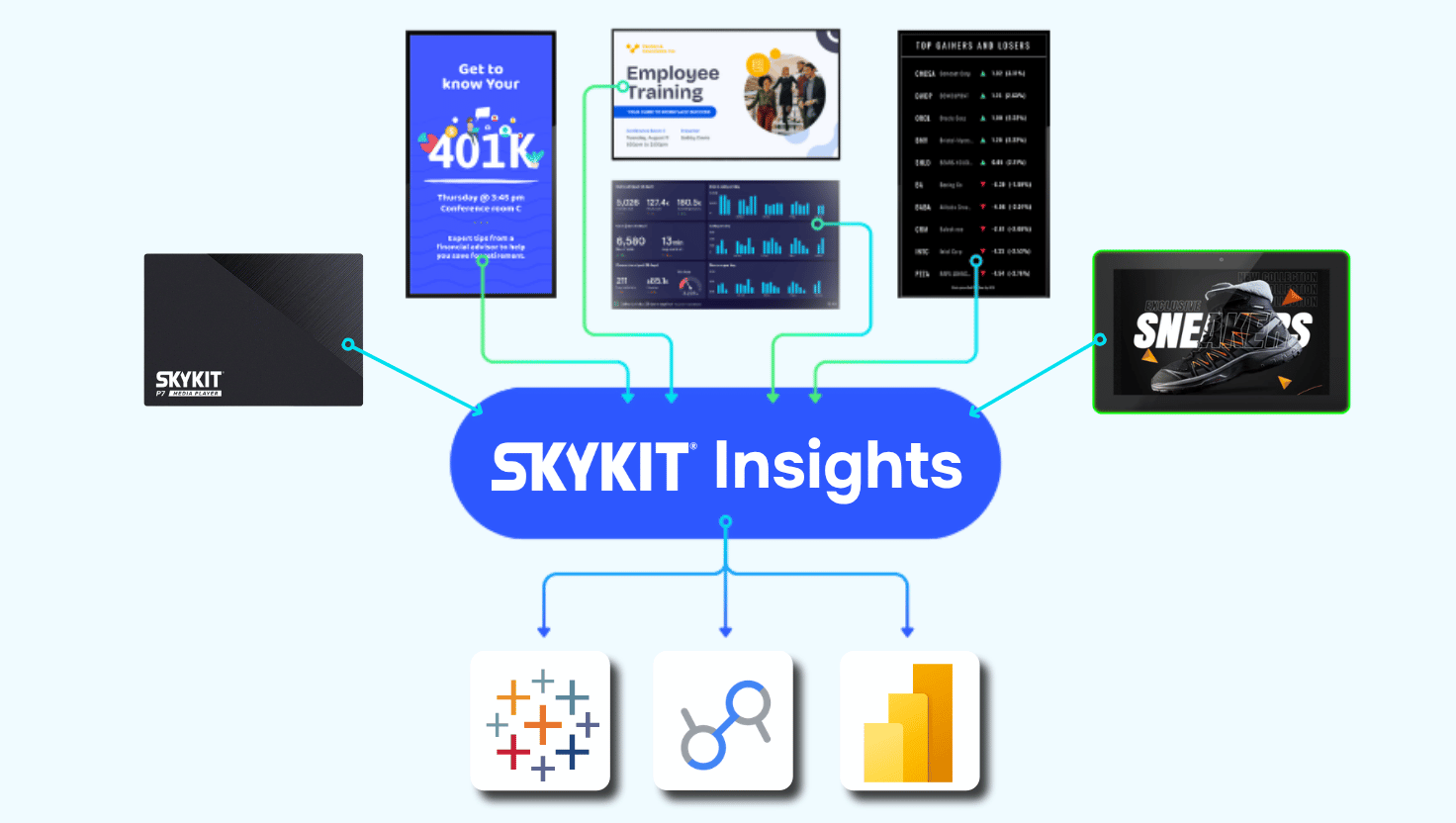
TL;DR: Skykit Insights is a new capability that gives you governed, near-real-time access to your Skykit device, playback, and content data inside the BI tools your team already uses. Instead of exporting CSVs tenant by tenant, you can report across your whole account, prove content delivery, and connect signage activity to the metrics that run your business. It's not another dashboard. It's a trusted data connection to the analytics you already rely on.
{{divider}}
What is Skykit Insights?
Skykit Insights is a governed data connection that brings your Skykit device, playback and content data into your own analytics environment. It's built on the same data Skykit uses to run your network, so your team sees your data and only your data.
It's also worth being clear about what Insights isn't. It isn't a replacement for your BI platform, and it isn't one more portal to log into. Your analysts keep working in the tools they know. Skykit remains the source of truth for the underlying data - and you decide how to analyze it, combine it and share it.
Why did we build Skykit Insights?
We built Skykit Insights because our customers were spending too much time getting their data out of Skykit and not enough time using it.
We heard the same story again and again. A network operator exports a CSV every morning to check which screens are online. An ad-ops team pulls playback reports by hand to answer an advertiser's question about delivery. A communications team asks us for a custom report to confirm a safety message ran at every site.
For our largest customers, the problem compounds. An operator running several brands or regions can’t see the whole network at once, so they export a separate CSV for each tenant and stitch them together in a spreadsheet just to answer one question.
Whatever the use case, each answer takes real effort, and each one goes stale the moment it's downloaded. We felt it on our side, too: every custom report request was time spent producing a one-off answer instead of improving the product for everyone.
Point-in-time exports made sense when networks were small. At scale, they become a bottleneck. What customers needed wasn't more rows of data. They needed evidence they could trust and act on: evidence that content played, that devices are healthy, and that decisions rest on a shared source of truth. Skykit Insights replaces those snapshots with data that updates in near real-time, consolidated at the account level.
What data does Skykit Insights provide?
Skykit Insights provides three core types of data, each answering a different question about your network.
→ Proof-of-Play data (shows what played, where, and when)
Playback records flow in near real-time, capturing which content ran on which screens and for how long. That's the foundation for campaign reconciliation, delivery reporting, and confirming that critical communications reached their audience.
→ Device state data (shows the health of your fleet)
Device data tells you whether each screen is online, how it's connected, and how its hardware is performing. It turns fleet monitoring from a reactive, screen-by-screen exercise into a network-wide view.
→ Software version data (shows what each screen is running)
Knowing which software versions are installed across your fleet helps IT teams spot outdated or inconsistent devices before they cause problems on the front line.
{{divider}}
How does Skykit Insights work?
Skykit Insights works by giving your team customer-scoped access to Skykit so you can query it directly instead of waiting on exports.
Documented schemas make the data understandable to your analysts, and saved queries support repeatable reporting you don't have to rebuild each time. Insights is designed to work with the BI environments enterprise teams already use, such as Power BI, Looker and Tableau, as well as customer-built data environments.
Because the data lands in your analytics environment, you can join it with information from your CRM, revenue systems, workforce tools, or operations platforms. That's where signage data becomes most valuable: alongside the business outcomes you already measure.
Who is Skykit Insights for?
Skykit Insights is for organizations that rely on their signage network and need to prove, monitor, or improve how it performs. Four types of teams stand to benefit most.
Ad networks - can defend delivery and speed up invoicing
When an advertiser questions whether a campaign ran as promised, playback data becomes your evidence. Insights helps ad-ops teams reconcile campaigns faster and strengthen advertiser trust.
Scaled enterprises - can see the health of every screen
For organizations running hundreds or thousands of devices, Insights brings device health, connectivity, and software status into one governed view, without stitching exports together.
Operations teams - can connect signage to business performance
Teams that already run on BI can place signage uptime and content data next to metrics like safety, productivity, or revenue to find issues and act sooner.
Communications teams - can prove critical content reached the field
Central teams can use playback data to confirm that required safety, leadership, or brand messages actually ran at every location - and to spot where they didn't.
{{divider}}
What does this look like in practice?
In practice, Skykit Insights turns a recurring manual chore into a connected, repeatable workflow.
One media network operator manages sponsored displays across a network of schools. Their team was exporting five spreadsheets every day just to monitor connectivity across the network. With Skykit data flowing into their BI environment, that daily routine became a repeatable report instead of a manual task, giving the team better visibility and returning hours to the operations staff.
How do you get started with Skykit Insights?
The best way to get started is a discovery session with Skykit. Together, we'll map four things:
- The reporting workflow you have today.
- The BI environment your team uses.
- The data you need.
- The business outcome you want to improve.
That conversation helps us make sure Insights is set up to answer the questions that matter most to your organization.
Key Takeaways
- What it is: Skykit Insights gives you governed, direct access to Skykit device, playback, and content data inside your existing BI tools.
- What it replaces: It eliminates repetitive CSV exports and one-off report requests, which go stale as soon as they're pulled.
- Who uses it: Ad networks can defend delivery, enterprises can monitor fleet health, and communications teams can prove reach, all from the same trusted source.
- Why it matters: Your data joins the rest of your business data, so signage performance can be measured against real outcomes.
- Where to start: A discovery session maps your workflow, BI environment, and goals.
{{cta}}

Want to see how Skykit Insights fits your analytics stack?
Talk with our team about bringing your Skykit signage data into the business intelligence tools you already use.











.svg)


