.svg)

TL;DR: As organizations scale digital signage across multiple locations, a single-tenant setup breaks down — corporate teams end up manually re-uploading the same content to dozens of separate environments. Skykit's multi-tenant structure with content sharing solves this: corporate manages one "master tenant" that pushes branded content automatically to every linked location tenant, while local teams retain full control over their own site-specific content. Updates publish once and propagate everywhere, with no risk of local teams editing or breaking the corporate message.
{{divider}}
When large organizations deploy digital signage across multiple locations, they quickly face a fundamental communication challenge:
How do you balance corporate messaging with location-specific content?
For enterprise customers with dozens or even hundreds of locations, this isn’t just a technical problem – it’s a strategic communication issue. Corporate teams need consistent brand messaging and company-wide announcements displayed across every screen. Local teams need to share information relevant to their specific employees and visitors. Both are essential, and managing both at once has traditionally been inefficient and frustrating.
Why Do Enterprises Outgrow Basic Digital Signage Management?
Most organizations start with a single-tenant environment: one central location where all users upload content, build playlists, and manage screens. That works well for single-location businesses, or any setup where one team handles all content creation.
As organizations grow, so do their communication requirements. Below, I'll walk through how Skykit's multi-tenant structure with content sharing solves this enterprise digital signage content management challenge.
What is a Multi-Tenant Structure in Digital Signage?
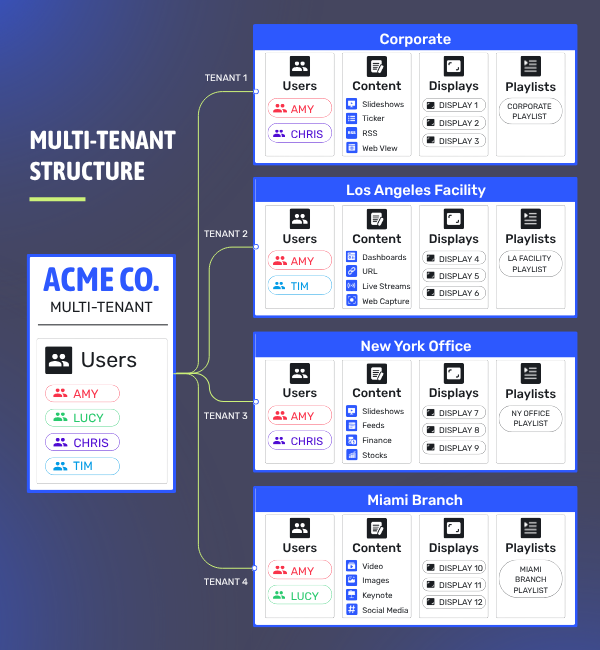
A multi-tenant structure divides a company's digital signage network into distinct, independently managed environments. Some examples:
- Corporate Tenant - For company-wide communications teams
- Location-Based Tenants - a Los Angeles facility, a New York office, a Miami branch
- Department-Based Tenants - HR, Sales, Warehouse
Each tenant operates as an independent environment with its own users, content library, and assigned displays. This allows local teams to manage their screens independently without needing to navigate through content that’s irrelevant to their location.
For example, a company might have 12 displays divided among four tenants – with each tenant responsible for three displays. Users can be assigned to one or multiple tenants depending on their responsibilities.
The Content Sharing Challenge
While the multi-tenant structure solves many problems, it creates a new one: how do corporate communications teams efficiently distribute branded content across all locations?
Without content sharing, corporate teams would need user accounts in every tenant – potentially dozens or even hundreds. They would need to upload the same content, create identical playlists, and maintain consistency manually across all these separate environments.
This approach is:
How Does Multi-Tenant Content Sharing Work?
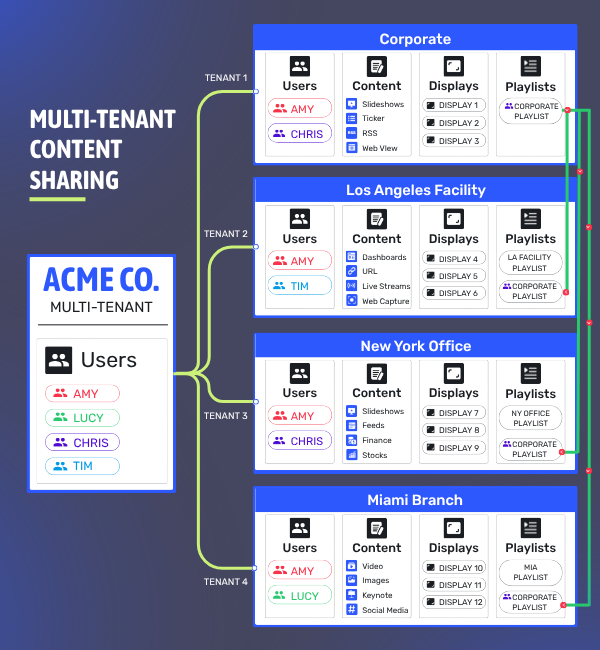
Multi-tenant content sharing designates a "master tenant" — typically the corporate communications team — that can share content directly with every other tenant, without giving up control of it.
Here’s what that looks like in practice:
- Corporate creates branded content in their master tenant.
- Corporate links playlists to selected location tenants.
- Local teams cannot edit the corporate playlists.
- Links cannot be broken unless corporate chooses to remove them.
- Updates publish automatically across all linked tenants.
- Local teams manage their own content that plays alongside corporate content.
This structure dramatically improves efficiency. When corporate updates a playlist – adding new videos, removing outdated content, or adjusting messaging – they simply hit “publish,” and those changes automatically propagate to every linked tenant (whether that’s 5 locations or 50).
How Do Labels Enable Advanced Content Targeting?
For larger enterprises with complex organizational structures, virtual labels applied to both displays and content create intelligent routing on top of the base tenant structure:
- Division-specific content can target only relevant screens.
- Language-specific playlists can be directed to appropriate locations.
- Department-specific messaging reaches the right audiences.
For example, one of our enterprise customers has a corporate tenant sharing content with 60 local tenants across six business divisions. They use labels to ensure division-specific announcements only appear on relevant screens, further refining their communication strategy.
What Are The Benefits of Multi-Tenant Content Sharing?
Corporate teams gain remarkable efficiency by updating content just once and distributing it everywhere, maintaining brand consistency across all locations while retaining control over important messaging. They also enjoy the flexibility to target content by location, division, or other criteria as needed.
Meanwhile, local teams preserve their autonomy to manage site-specific content without corporate interference. They can focus exclusively on creating location-specific messaging without worrying about maintaining corporate content. This simplifies their workflow and ensures all communications remain relevant to their specific audience.
The entire organization benefits from this balanced approach. The multi-tenant structure provides scalability to easily manage content across hundreds of screens while requiring fewer people to effectively manage more displays. Most importantly, it maintains unified corporate communications while enabling distinct local voices, creating a comprehensive communication strategy that serves all stakeholders.
What Types of Content Can Be Shared?
There are no limitations on the types of content that can be shared through this system. Whether you’re distributing:
- Video files
- PDF documents
- Image slideshows
- Live dashboards from sources like PowerBI or Tableau
- Web content
- RSS feeds
All content types supported by Skykit Beam work through content sharing.
How Do You Implement Multi-Tenant Content Sharing?
After training hundreds of enterprise customers, I’ve developed a straightforward approach to help organizations implement effective content sharing. Here’s how successful companies typically navigate this process:
Mapping Your Communication Ecosystem
The journey begins with understanding your organization’s communication landscape. Most enterprise teams start by identifying their master tenant (typically housing the corporate communications team) – and mapping out local tenants representing different locations or divisions. This exercise reveals natural content ownership boundaries, and highlights any special considerations like language requirements across regions.
Empowering Corporate Communications
For the corporate communications team, preparation is key. Successful teams organize standardized content collections by purpose, whether that’s core branding assets, company-wide announcements or leadership updates. They develop thoughtful labeling strategies that allow for targeted content distribution. With content organized and properly labeled, they can create a strategic sharing plan detailing which playlists will appear at which locations.
Enabling Local Excellence
Local site administrators thrive when they can focus on what they know best – their specific location and audience. With corporate content automatically flowing to their tenant, these teams can concentrate on creating complementary local messaging that speaks directly to their employees or customers. The best implementations ensure local teams understand how to incorporate shared corporate content into their local playlists while maintaining their displays with basic troubleshooting knowledge.
Building Sustainable Workflows
Long-term success depends on creating manageable processes. Organizations typically establish regular corporate content update schedules – whether weekly, monthly or quarterly – and clear communication channels between corporate and local teams. Many implement light quality control processes to maintain professional standards while documenting their label taxonomy to ensure consistency as their network grows.
This approach creates natural separation of responsibilities while maximizing efficiency. Corporate teams maintain control over branded messaging, local teams preserve autonomy over site-specific communications, and the entire organization benefits from streamlined digital signage management without redundant work or confusion.
{{divider}}
Is Multi-Tenant Content Sharing Right for Your Organization?
If your organization has multiple locations with digital signage and struggles with balancing corporate and local messaging, Skykit’s multi-tenant content sharing could transform your communication strategy.
This approach delivers exceptional value for multi-location enterprises with corporate communications needs, especially those with division-specific messaging requirements. Organizations with diverse geographic footprints find particular benefit, as do businesses seeking to empower both central and local communications teams at the same time.
{{divider}}
FAQ
What is a master tenant? The master tenant is the environment — typically owned by the corporate communications team — that creates and shares branded content with every other tenant in the network. It's where corporate-controlled content originates before being linked out to local tenants.
Can local teams edit content shared from the master tenant? No. Corporate playlists linked into a local tenant can't be edited by that tenant's users, and the link can't be broken except by corporate. Local teams manage their own separate content, which plays alongside the shared corporate content.
How many tenants can share content from one master tenant? Tere's no fixed limit — Skykit customers run this structure anywhere from a handful of locations to networks of 60+ tenants across multiple business divisions.
What happens when corporate updates shared content? The update publishes once from the master tenant and propagates automatically to every linked tenant, with no manual re-upload required at any individual location.
What content types work with content sharing? All content types supported by Skykit Beam — video, PDF, image slideshows, live BI dashboards (Power BI, Tableau), web content, and RSS feeds.
{{cta}}

Interested in Learning More?
See how Skykit can help your organization master multi-location digital signage. Contact our team today for a personalized demonstration.







.svg)


