.svg)

TL;DR: Manual exports and custom report requests may work okay for small signage networks, but they break down as networks grow. More screens, more stakeholders, and higher stakes create a reporting burden that spreadsheets can't carry. The answer isn't another dashboard. It's a governed way to connect signage data to the BI tools and business context your organization already uses, so signage becomes a trusted input to decisions instead of a separate reporting chore.
Why do manual digital signage reports stop working at scale?
Manual digital signage reports stop working at scale because every new screen, location, and stakeholder multiplies the effort needed to produce each answer.
Consider a common scenario. An advertiser questions whether their campaign ran as contracted, and the invoice sits unpaid until someone proves it did. The ad-ops team exports playback logs, filters them in a spreadsheet, and assembles a report. By the time it's done, the data is already a day old, and next week another advertiser asks the same question.
The same pattern shows up across the organization. IT teams download device reports to check which screens are offline. Communications teams ask their vendor for a custom report to confirm a safety message ran at every site. Each request is its own task, and each answer is a snapshot that starts going stale the moment it's saved.
At a few dozen screens, that's manageable. At hundreds or thousands, it becomes a bottleneck. Decisions slow down, reports conflict because they were pulled at different times, and signage data stays cut off from the systems where the business measures results.
What questions should digital signage data answer?
Digital signage data should answer three core questions: what played, what is healthy, and what needs attention.
→ What played (shows delivery and reach)
Playback records confirm which content ran on which screens, when, and for how long. That's the evidence behind advertiser invoices, campaign reports, and proof that required communications reached the field.
→ What is healthy (shows the state of the fleet)
Device data shows whether screens are online, how they're connected, and what software they're running. Across a large network, that's the difference between spotting problems early and hearing about them from frustrated employees or customers.
→ What needs attention (shows where to act)
The most valuable insight comes from combining the first two: a screen that's online but didn't play a required message, or a location where uptime dropped during a key campaign. These are the answers that lead directly to action.
What is Proof of Play reporting?
Proof of Play reporting is the practice of using playback records to verify that specific content ran on specific screens at specific times.
For digital out-of-home and retail media networks, Proof of Play is the basis for billing. Advertisers pay for delivery, and playback records are how networks show they delivered. For enterprises, the same data answers a different question: did the safety update, leadership message, or brand campaign actually reach the screens it was meant for?
Proof of Play is only as useful as it is accessible. When playback data is locked inside exports, reconciliation is slow. When it flows into the tools where teams already work, it becomes a repeatable, shareable source of evidence.
How is connected signage data different from another dashboard?
Connected signage data brings your signage information into the analytics tools you already use, while a dashboard asks your team to adopt one more tool.
Most organizations at scale already have a BI platform such as Power BI, Looker, or Tableau, along with analysts who know how to use it. A separate signage dashboard can offer a quick view, but it keeps signage data isolated. You can see uptime in one place and revenue in another, but you can't easily compare them.
Connected data takes a different approach. It delivers governed signage data inside your existing analytics environment, where your team can join it with CRM, revenue, workforce, or operations data. The signage platform remains the source of truth, while your team controls how the data is analyzed and shared.
What are the most common uses for digital signage analytics?
The most common uses for digital signage analytics are advertiser reconciliation, fleet operations, operational analytics, and content integrity.
✅ Advertiser reconciliation - protects revenue
Ad networks use playback data to answer delivery questions quickly, support invoicing, and build advertiser trus
✅ Fleet operations - reduce downtime
IT teams use device data to monitor health, connectivity, and software status across the whole network. They catch problems before they become service calls or on-site visits.
✅ Operational analytics - connects signage to outcomes
Data-mature organizations place signage uptime and content data alongside business metrics like productivity, safety, or sales. That makes it possible to measure what signage actually contributes.
✅ Content integrity - proves comms reached the field
Corporate communications teams use playback data to confirm that required messages ran at every location. They can also spot where content failed to play or was replaced locally.
What should you evaluate in a digital signage analytics solution?
When you evaluate a digital signage analytics solution, focus on six areas: freshness, schemas, access control, retention, tenant isolation, and cost. These are the questions to ask any vendor.
- Freshness: How current is the data when it reaches your analytics environment? What latency does the vendor commit to, and is that commitment documented?
- Schemas: Is the data structure documented clearly enough for your analysts to use without constant vendor support?
- Access control: How is access governed? Can you control who sees what, and does the model meet your security team's requirements?
- Retention: How long is historical data kept? Does that support your reporting, audit, and trend-analysis needs?
- Tenant isolation: If you operate multiple brands, clients, or business units, how is each one's data kept separate?
- Cost: How is pricing structured, and who pays for data queries and storage as usage grows?
Clear answers to these questions help you avoid surprises after deployment and compare vendors on equal terms.
How should you prepare your BI and data teams?
Preparing your BI and data teams starts with defining the business question before connecting any data.
Start by identifying the decision, invoice, or workflow that depends on signage data today, and how your team gets that answer now. Then confirm who will build and maintain the analysis, whether that's an internal BI team or a data partner. Loop in IT and security early, since they'll need to review access and controls. Finally, agree on how success will be measured: faster invoicing, fewer service calls, less time spent on manual reporting, or proven communications reach.
Teams that start with a clear question get value quickly. Teams that start with "let's get all the data" often end up with plenty of rows and few answers.
How does Skykit approach digital signage analytics?
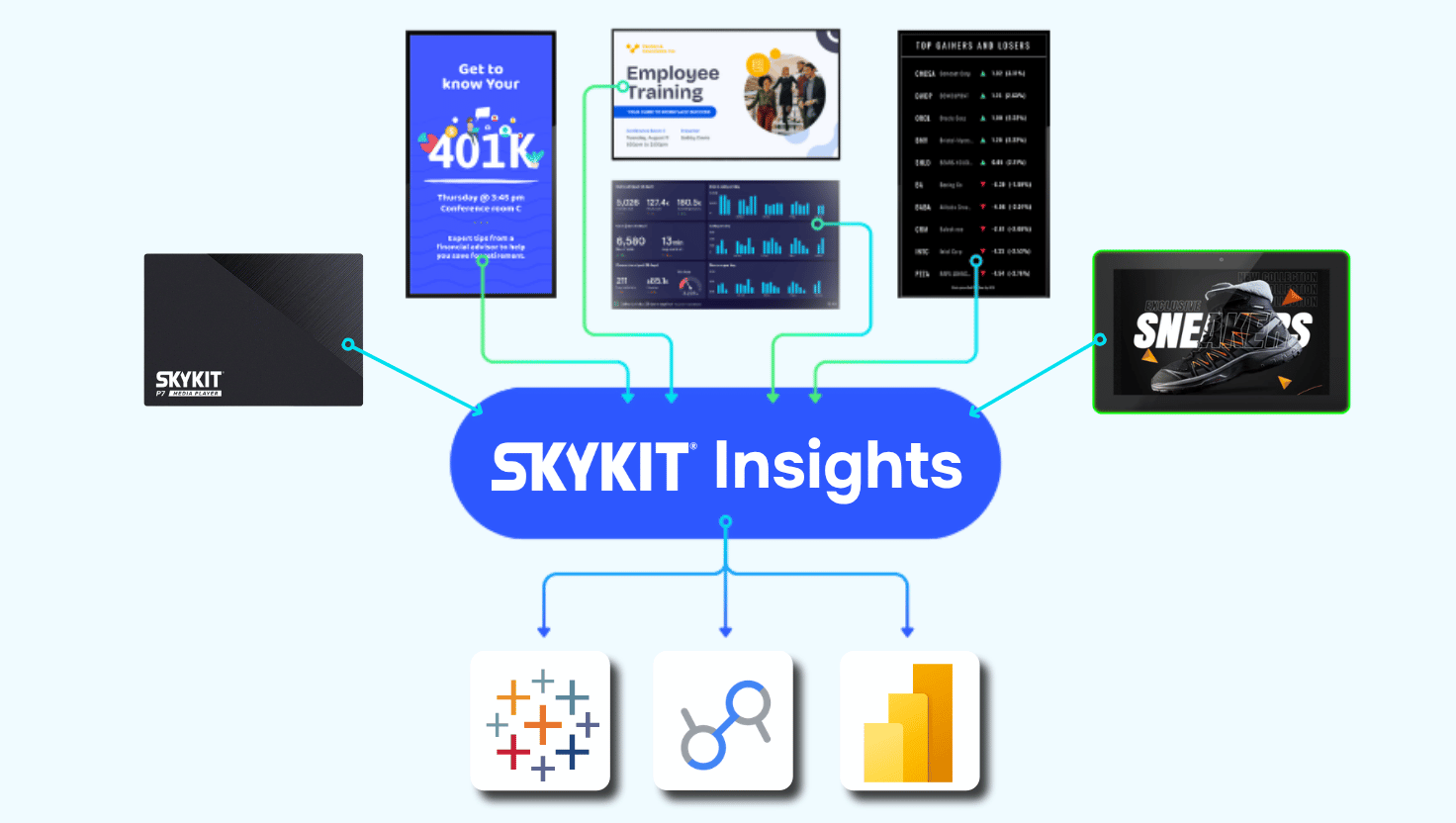
Skykit approaches digital signage analytics through Skykit Insights, which gives customers governed, near-real-time access to their device, playback, and content data inside the BI tools they already use. Instead of exporting reports tenant by tenant, teams can report across their whole account and join Skykit data with the rest of their business data. Read the launch announcement: Introducing Skykit Insights.
Key Takeaways
- Manual exports don't scale: Every new screen and stakeholder adds reporting work, and every export is out of date as soon as it's pulled.
- Three questions matter: Signage data should show what played, what is healthy, and what needs attention.
- Connected beats isolated: Bringing signage data into your existing BI tools lets you measure it against real business outcomes.
- Evaluate carefully: Ask every vendor about freshness, schemas, access control, retention, tenant isolation, and cost.
- Start with the question: A defined business outcome gets results faster than a broad data grab.
{{cta}}

Ready To Move Beyond Manual Signage Reports?
Talk with Skykit about bringing your signage data into the BI tools your team already uses.









.svg)


