


"Skykit has transformed our ability to reach passengers and employees with real-time updates—saving time, improving efficiency, and enhancing the overall experience."


Skykit Platform Overview
Skykit is an enterprise digital signage platform that provides the software, operating system, and hardware from one vendor - including content management, device management, live BI dashboard integrations, and purpose-built media players.
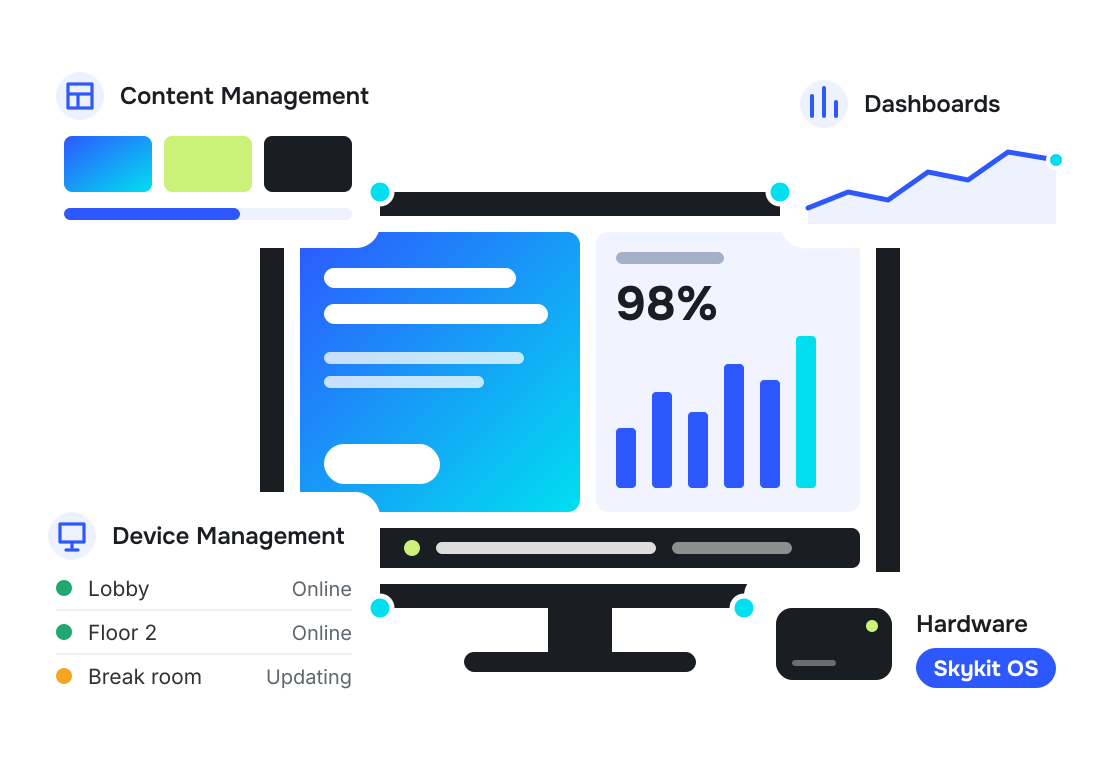
The Skykit platform has four parts: a content management system, device management, real-time data dashboard integrations, and purpose-built hardware. Together they cover everything you need to create, manage and scale a digital signage network.
An intuitive content management system (CMS) that scales from 10 screens to more than 10,000.
Monitor, update and troubleshoot every screen remotely, with firmware-level control that software-only platforms can't provide.
Show live metrics where your teams work so they can respond in real-time, not hours later.
Media players and touch displays built for enterprise digital signage. Every device runs Skykit OS, Skykit's proprietary operating system.

"We were struggling with inconsistent solutions, and IT was spending too much time assisting users. When we tested Skykit, we were amazed by how easy it was to use. It’s cost-effective, and since it’s cloud-based, we can keep expanding without worrying about outgrowing it."
Beyond everyday signage, Skykit supports ad network monetization, custom-build solutions, enterprise security, and cellular connectivity for demanding deployments
Turn displays into revenue with programmatic advertising, exchanges, and proof-of-play reporting.
Use Skykit device management infrastructure and APIs to deploy your own applications and build exactly what you need.
SOC 2 compliance with firmware-level lockdown and enterprise authentication for maximum security.
Deploy Without Boundaries: Enterprise Cellular Connectivity.
Feature

Software-Only
Hardware-Only
Built-in CMS with scheduling, permissions, and 100+ integrations
Built-in CMS
Requires a partner CMS
Built-in, down to the firmware
LImited to what the player app can reach
Vendor tool, separate from the CMS
Complete, with Skykit OS on every device
Limited, because it runs on another vendor's hardware
Hardware only, with no content layer
SOC 2 Type 2 plus firmware-level lockdown
Software controls only
Depends on the CMS partner
Reboot, update, and configure any Skykit device remotely
Content updates only; device fixes often require a site visit
Device actions only
10 screens to more than 10,000 per network
Varies with the hardware mix
Varies with the CMS partner
One vendor for software and hardware
Software issues only
Hardware issues only
Four reasons: security, performance, control, and accountability. One vendor to call, tighter security, predictable performance, and complete remote control are only possible when software and hardware are built together.
One call. Skykit owns the entire solution.
Multiple vendors to coordinate. Finger-pointing when issues arise.
Software and hardware locked down together, so devices can’t be reprogrammed, accessed, or compromised by unauthorized users.
Consumer-grade hardware with security gaps, and no control over what the device does.
Predictable and reliable. Software and hardware designed as one system.
Inconsistent. It depends on a component mix that isn't optimized to work together.
Diagnose and resolve issues across software, OS, and hardware remotely, in one view.
Is it the hardware, software, or the OS? Each gets tested separately.
Skykit updates everything together, with no compatibility issues.
Updates coordinated across vendors, with compatibility left to chance.
Hardware and software locked down together so devices can't be reprogrammed, accessed, or compromised by unauthorized users.
No compatibility conflicts, no unpredictable component interactions, no finger-pointing when something doesn't behave as expected.
Diagnose and resolve issues across your entire system remotely — hardware, software, and OS in one view.
One call resolves everything. One vendor owns the outcome. No compatibility excuses.
Skykit works in four steps: connect, organize, distribute, and monitor. Go live in days, not months, then manage hundreds of locations from one platform.

Media Player → Display
Pair Skykit media players to your displays using WiFi, Ethernet, or LTE cellular connectivity on the E400, with automatic discovery and provisioning.

Content Management (Skykit Beam)
Build playlists, schedules, and campaigns in the Skykit CMS, and organize screens into groups for streamlined control.

Content → Display
Deploy content to specific screens or groups by time, day, and location, with emergency override when urgent messages are needed.

Device Management (Skykit Control)
Track real-time device health, and troubleshoot remotely to keep every screen running.
Skykit connects to 100+ business tools and data sources, including Power BI, Tableau, Salesforce, and Grafana.

Salesforce

Google Data Studio

Looker

Qlik

SharePoint

Excel Online

Grafana

Metabase

Sisense
Skykit secures every layer: independently audited SOC 2 Type 2 compliance, firmware-level device lockdown, and enterprise authentication.
Independently audited for security, availability, and confidentiality.
Device security that software-only platforms cannot provide.
SSO/MFA support (SAML), role-based access control, encrypted transmission.

"Skykit has transformed our ability to reach passengers and employees with real-time updates—saving time, improving efficiency, and enhancing the overall experience."
“With Skykit, I can update content in seconds—whether it’s an HR announcement or a weather alert.”

"The ability to update screens remotely and schedule content in advance has saved us time and resources while keeping our messaging fresh and relevant."

See why organizations choose Skykit to power their digital signage operations.




Connect with a digital signage expert to see how the Skykit platform can meet your needs.

Skykit Platform
The Skykit platform is an enterprise digital signage platform that provides the software, operating system, and hardware from one vendor - including content management, device management, real-time BI dashboard integrations, and purpose-built media players. More than 1,000 companies use Skykit to manage over 120,000 screens, from a single office to hundreds of locations.
Skykit runs on Skykit media players, Skykit F-Series touch displays, and system-on-chip (SoC) displays from partners Sony, Hisense, Bluefin and Philips. You can use the commercial displays you already have by connecting a Skykit media player to each one over HDMI. Skykit does not run on third-party media players, which keeps every device secure and centrally managed. Read more about Skykit Hardware
Skykit media players run Skykit OS, Skykit’s proprietary operating system built for digital signage. Skykit OS keeps each device in a locked-down kiosk mode, so it runs only Skykit software and shows only approved content. Skykit OS also runs on Skykit F-Series touch displays and partner SoC displays.
Skykit provides the software, operating system, and hardware together, while software-only digital signage platforms run on media players from other vendors. Because Skykit controls the full stack, IT teams get firmware-level security, remote device management, and one vendor to call for support. Software-only platforms manage content but have limited control over the device itself. Read more about Skykit Device Management
Yes. Skykit is SOC 2 Type 2 compliant and secures digital signage at the device, data, and access levels. Skykit devices run in firmware-locked kiosk mode, data is encrypted in transit (TLS 1.2+) and at rest (AES-256), and access is controlled through single sign-on, multi-factor authentication, and role-based permissions. See Skykit Trust Center
Yes. Skykit displays live dashboards from Power BI, Tableau, Salesforce, Looker, Grafana, and other business intelligence (BI) tools on any screen running Skykit, as part of its 100+ integrations. Dashboards refresh automatically, and Skykit monitors each dashboard connection so the data on screen stays current. Learn about Skykit Dashboard Connections
Skykit manages digital signage networks of any size, from 10 screens in one office to more than 10,000 across hundreds of locations. In total, Skykit powers over 120,000 screens for 1,000+ companies. Screens are organized into groups, so each location or department manages its own content while IT keeps central control.
Skykit pricing starts at $16.50 per display per month for the Base plan. Pro and Enterprise plans are priced by quote because every organization’s digital signage needs are different. A Skykit digital signage expert works with you to build a plan that fits your organization. Every Skykit plan includes unlimited users and unlimited cloud storage. See Skykit Plans and Pricing


